Data Resources for the Research Administration Community
Learn about U-M research administration data resources, including the Report Library, Tableau, BusinessObjects and OARS access roles.
On this page
This page summarizes some of the data resources available at U-M for the research administration community. Information was compiled through an effort led by the Research Administration Advisory Council (RAAC).
For simple queries, use eResearch and the Search for Awards ITS Guide. For more complex queries, the resources below may help.
In some cases, users may need access privileges granted by the Online Access Request System (OARS). Learn more below.
Report Library
The Report Library is a list of curated reports from multiple reporting tools, and it is available to research administrators in the Report Library via Wolverine Access.
- Report Library – M-Reports Direct Link: Report Library in M-Reports
- Via Wolverine Access: Faculty & Staff > Reporting > Report Library
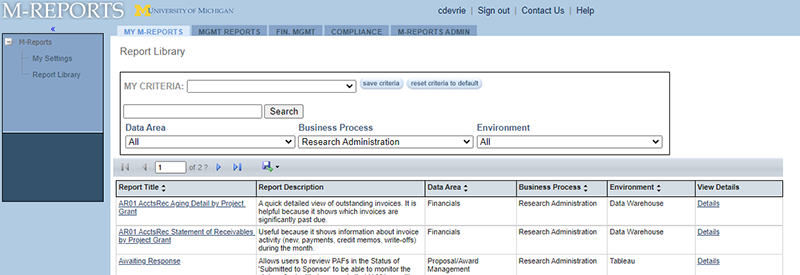
Once in the Report Library, filter the “Business Process” by “Research Administration.” (See Image 1 below). The results include finance and human resources reports related to research administration.
Tableau
A series of RAAC Metrics Tableau visualizations were first published in June 2017 with the intention to help schools/colleges/units/departments explore trends in their research administration data.
The visualizations are accessed via Wolverine Access and contain valuable information related to Proposals, the ORSP Deadline Policy, Success Rates, Awards, Budget Period Funding, Expenditures and Receivables.
- Direct Link: Tableau Table of Contents
- Via Wolverine Access: Faculty & Staff > Reporting > Tableau > RAAC Metrics
Who has access?
- MCommunity Groups:
- RAAC Committee-at-Large
- Deans
- Research Associate Deans
- Budget Administrators Group
- Additional groups are maintained by units (contact RAAC Metrics for more info)
- OARS Proposal Management BusinessObjects users (for Proposal/Award reports)
- OARS Financials BusinessObjects users (for Expenditures/Receivables reports)
Business Objects
There are two collections of reports you may want to access in Business Objects.
UM-Maintained: This is a collection of reports formally maintained by the ORSP Data and Reporting team. Some examples are: Proposals, Awards, Other Reports. (See image below.)
- Via Wolverine Access: Faculty & Staff > Reporting > U-M Data Warehouse (BusinessObjects ) > Folders > Public Folders > UM-Maintained > Research
Unit-Maintained: This is a collection of community reports from research administrators across U-M, an effort to informally share useful reports beyond the formal reports found in UM-Maintained. RAAC Metrics welcomes suggestions to this collection as research administrators have reports they feel worth sharing with colleagues across campus.
- Via Wolverine Access: Faculty & Staff > Reporting > U-M Data Warehouse (BusinessObjects ) > Folders > Public Folders > Unit-Maintained > Research Administration
If a unit does not have access to BusinessObjects and its U-M-Maintained/Research Reports, contact 4-HELP or email [email protected] with the Subject: “eRPM ORSP Tier 3” and the details of your request.
OARS Roles
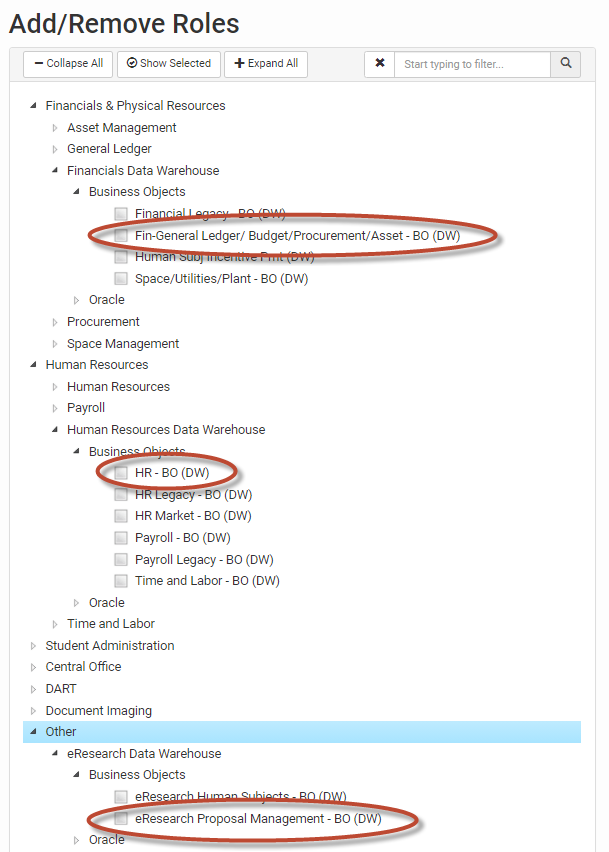
In order to run the reports available in the Report Library, OARS roles are required. Follow school, college, or unit (SCU) on how to obtain this access. Some SCUs have specific individuals that submit the access requests. That individual can provide guidance in determining the role needed and work with the appropriate approver.
Required roles for running all reports:
- Financials Universe role – “Fin-General Ledger/Budget/Procurement/Asset – BO (DW)”
- Human Resources role – “HR – BO (DW)”
- Proposal Management role – “eResearch Proposal Management – BO (DW)”
As always, check with individual units to inquire about any additional procedures.
Questions?
Email [email protected]