NIH eRA Commons Registration and ID Lookup
eRA Commons IDs are required for National Institutes of Health proposals and awards. Learn about requesting, updating, affiliating, and looking up NIH eRA Commons IDs at U-M.
eRA Commons is the National Institutes of Health’s (NIH) electronic system required for managing NIH proposals and awards. To begin using eRA Commons, individuals must register for a Commons ID. U-M ORSP staff are the designated officials who register and update the NIH eRA Commons IDs for all U-M faculty, staff and students. This page contains information on creating an ID, adding or changing roles, affiliating an ID with U-M, and looking up U-M-affiliated Commons IDs.
Steps to request or update a Commons ID
Access and sign in to eRPM
Before completing the form for a future/existing Commons ID, the requester must have previously signed into eResearch. Doing so creates a “person account.” ORSP registers the ID in eRPM and cannot proceed if an individual has not signed in. See Instructions to Login to eRPM.
Complete the U-M eRA Commons Request Form
Complete U-M NIH eRA Commons Request/Update Form for requests to obtain a new Commons ID or to add/remove roles to an existing Commons ID. Completion should take 1-3 minutes.
If you are unsure about the Role or “Type of User” to select in the form, refer to the eRA Commons User roles on the NIH website.
For role changes, be sure to provide the existing Commons ID. If affiliated with U-M, existing Commons ID can usually be found in eResearch. If an individual is having trouble finding this information, proceed with the form, and ORSP will work with the person to locate and verify the ID.
Note, for new faculty or students or others working with U-M, a U-M email address is needed before an ID can be requested or changed. Contact the relevant school or college to get a sponsored affiliate email address or to proceed with obtaining a U-M email address first. For individuals who do not have an ID and who are not affiliated with U-M, they should work with the department the NIH grant will be with to get sponsored as a U-M affiliate. ORSP does not manage roles for non-U-M users.
Receive an email notification
After ORSP completes the request, the individual will receive an email notification titled, “eRA Commons Notification of Authentication Credentials and New eRA Account” from [email protected]. This email allows users to reset a password.
Questions?
Contact [email protected].
Logging in with a Federated Account
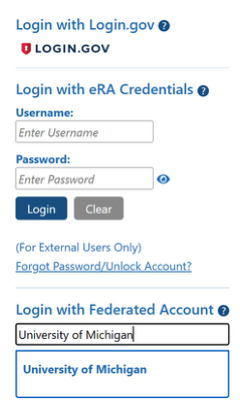
Once an individual has a Commons ID and password to eRA Commons, ORSP encourages individuals to use the “Login with Federated Account” option for simplicity and added security. To do this, select the University of Michigan under the “Login with Federated Account” option on eRA Commons. Users will be prompted to log in using their U-M two-factor authentication to access the Commons. Make sure your Commons password has not expired. Otherwise, you will not be able to link your Commons account to the U-M federated login.
Looking up faculty/staff eRA Commons IDs
The eRA Commons ID lookup is now contained in eRPM. View these step-by-step instructions for looking up an eRA NIH Commons ID in eRPM. (If access is needed to eRPM to conduct this search, first see ITS eRPM Job Aid.)
Troubleshooting issues with eRA Commons IDs
Issue: An individual with a University of Michigan PI role is unable to add a delegate in the RPPR system.
Information: Delegates must be affiliated with the same institution. The delegate must have the PI or ASST role in NIH eRA Commons. When logged in, click on the person icon in the top left corner to ensure the correct institution is displayed. If not, select the option to “Change/Switch Organization.” For more information, visit Delegations on the eRA Commons website.
Issue: Merging two NIH eRA Commons accounts
Information: Follow the instructions outlined by NIH: Consolidate Multiple eRA Commons Accounts.
Issue: Linking an ORCID account
Information: Contact the eRA Service Desk. ORSP does not have access to manage ORCID account troubleshooting. For more information, The ORCID iD.
Issue: Linking a ScienCV account
Information: Visit the ScienCV help page. ORSP does not have access to manage ScienCV account troubleshooting.
Issue: Removing a role or affiliation at a prior institution
Information: ORSP can only manage University of Michigan accounts and roles. To remove roles from a prior institution, please contact the prior institution.
Issue: Updating an email address after leaving U-MInformation: Complete the U-M NIH eRA Commons Request/Update Form and leave a comment at the end of the form. ORSP will update the email address and remove all University of Michigan roles. The new institution will need to add the individual’s new roles.